
Ulefone Rugged Tech Review: A Deep Dive into Armor, RugKing, and More
Disclosure: this page contains affiliate links. We may earn a commission if you buy through them, at no extra cost to you.

Introduction
Welcome to CompareBest’s in‑depth review of Ulefone. This article walks you through every major segment of the brand’s rugged ecosystem, from smartphones built to survive the toughest job sites to tablets designed for on‑the‑go data capture, and from compact mini PCs that turn a pocket‑sized device into a full‑featured workstation to accessories that extend durability, connectivity, and productivity. The target audience includes outdoor professionals such as construction managers, field service engineers, and utility workers; adventure enthusiasts who need a phone that can handle a mountain climb or a kayaking trip; and enterprise decision‑makers evaluating durable hardware for large‑scale deployments. Throughout the post we’ll highlight practical scenarios—like mounting a phone on a hard‑hat for real‑time video inspections, or using an RFID‑enabled tablet to inventory warehouse stock—so you can see how Ulefone’s offerings fit into real‑world workflows and decide whether the brand aligns with your needs.
Ulefone Product Portfolio at a Glance
Ulefone structures its catalog around three core pillars: rugged smartphones, rugged tablets, and a complementary set of accessories that reinforce durability while adding functional flexibility. Each pillar is designed to address a specific set of challenges that typical consumer devices struggle with, such as exposure to dust, water, shock, and extreme temperatures.
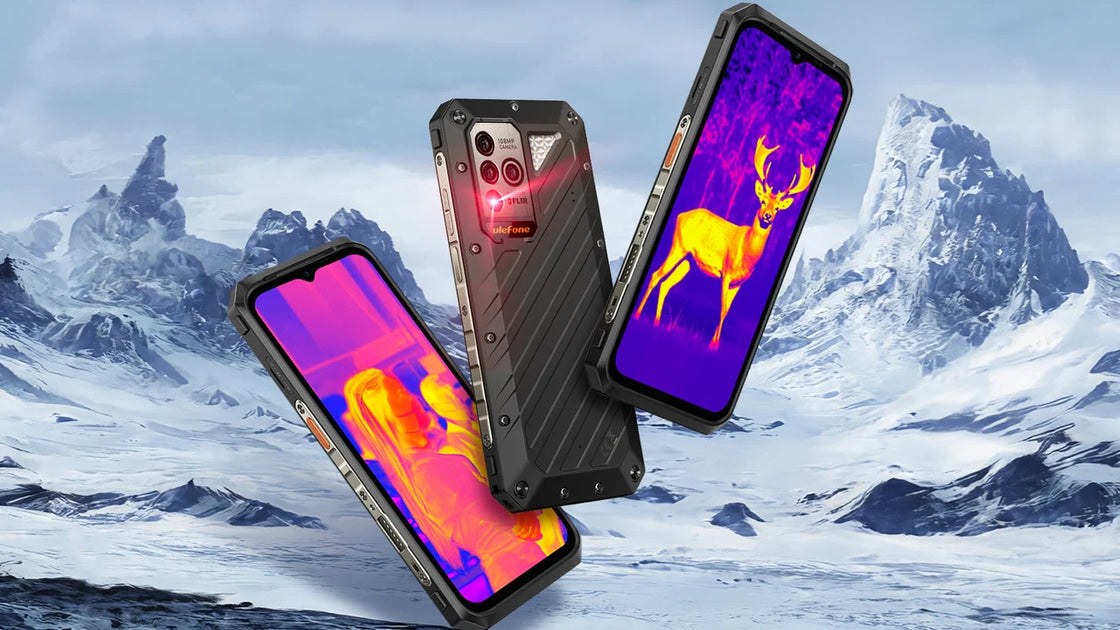
- Armor Series – A family of rugged phones that starts at Armor 24 and progresses through Armor 34, with the newer Armor X line (including the X12 and X16 Pro) delivering advanced imaging and connectivity options.
- RugKing Series – A line of rugged tablets ranging from RugKing 2 Pro up to RugKing 5 Pro, plus additional RugKing models that share the same reinforced chassis and optional RFID capabilities.
- uSmart Accessories – Mini PCs such as the E03, C01, E02, and the compact E01, offering fanless operation and a variety of I/O ports for edge‑computing tasks.
- RFID Kits – UHF RFID reader‑writer modules specifically engineered to integrate with Armor phones and RugKing tablets, enabling quick tag scans in logistics or inventory scenarios.
- Mounts & Protection – A suite of mounting solutions—Next‑Gen, Pro, Max‑Tablet Holder, and Go—plus tempered‑glass screen protectors tailored for each device family, ensuring that devices stay securely attached and screens remain scratch‑free.
- Audio & Power – Ulefone Buds for hands‑free communication and a 50 W wireless charging stand that can top up a massive battery without fiddling with cables.
- Enterprise Tools – Integrated POC (Proof‑of‑Concept) kits, RFID solutions, and MDM (Mobile Device Management) software that simplify large‑scale rollout, monitoring, and security management.
Comparison Table: Key Rugged Families
| Family | Device Types | Notable Features | Target Use‑Case |
|---|---|---|---|
| Armor | Smartphones (Armor 24‑34, X12, X16 Pro) | 5G connectivity, massive battery capacity, thermal imaging, night‑vision camera, waterproof (5 ATM) | Field work, outdoor adventure, logistics, emergency response |
| RugKing | Tablets (2 Pro‑5 Pro) and standard RugKing tablets | Large display, reinforced chassis, optional UHF RFID integration, IP68‑level sealing | On‑site inspections, data capture, map navigation, field data entry |
| uSmart | Mini PCs (E03, C01, E02, E01) | Compact fanless design, multiple I/O ports, fan‑less operation for silent environments | Edge computing, remote kiosks, portable workstations, IoT gateways |
Why Ulefone Stands Out
Ulefone promotes a combination of longevity, connectivity, and enterprise‑ready features that directly address the pain points of rugged‑device buyers. With 16 years of experience and a user base that exceeds five million across more than 100 countries, the brand claims a depth of expertise that translates into tangible product benefits.
1. Durability Engineered for the Real World
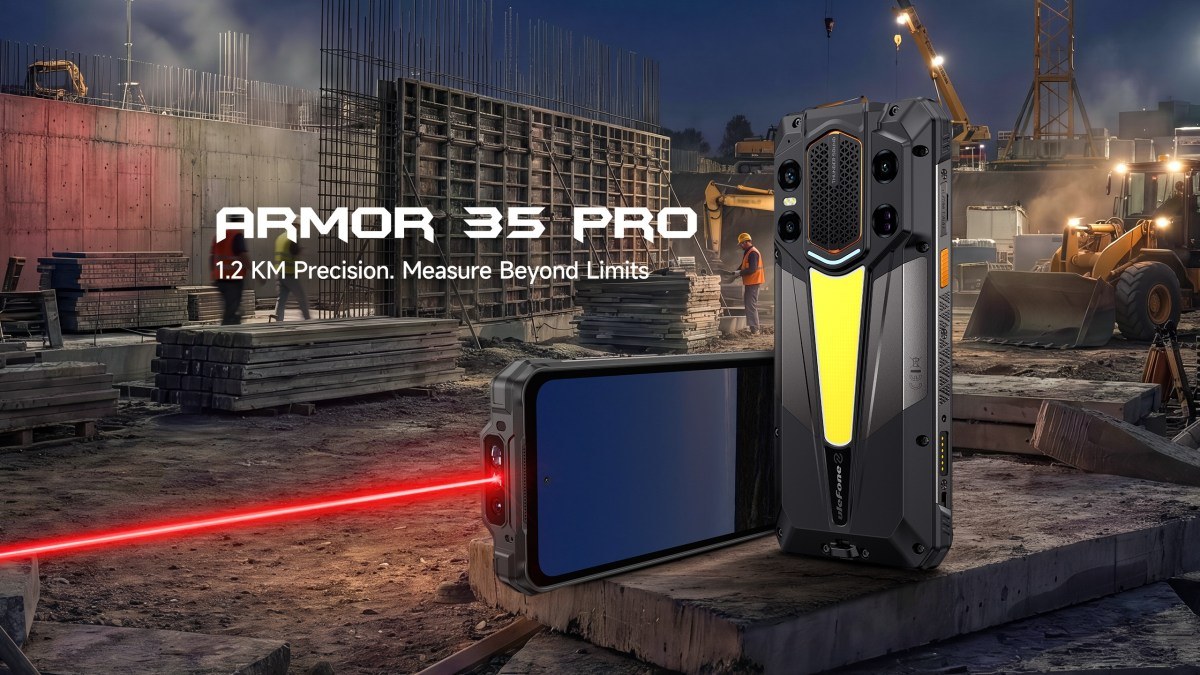
Every Armor and RugKing device is built to meet military‑grade standards, meaning they undergo tests for drop resistance, vibration, and environmental sealing. Phones sport a 5 ATM rating—equivalent to being submerged up to 50 meters—while tablets achieve IP68‑level sealing, protecting against dust ingress and prolonged water exposure. The reinforced frames incorporate rubberized corners and shock‑absorbing materials that mitigate the impact from drops onto concrete or steel. In addition, Ulefone supplies a range of mounting solutions: the Next‑Gen mount is ideal for attaching a phone to a hard‑hat visor for hands‑free video capture; the Pro mount offers a sturdy bracket for vehicle dashboards; the Max‑Tablet Holder can cradle a RugKing tablet on a workbench; and the Go model provides a lightweight clip for belt or backpack attachment. These mounts are designed to maintain the device’s sealed envelope, ensuring that the protective rating is not compromised when the device is mounted.
2. Connectivity That Doesn’t Quit
Ulefone’s newer Armor smartphones tout ultra‑fast 5G connectivity, a crucial advantage for professionals who rely on real‑time data transmission. Whether you’re streaming live video from a construction site, uploading high‑resolution thermal images for remote analysis, or accessing cloud‑based GIS maps in the field, 5G ensures low latency and high bandwidth. Coupled with the brand’s “massive battery” claim, these phones can operate for an entire shift—often 8‑12 hours—without needing a recharge. The large battery also supports power‑intensive features such as night‑vision cameras and continuous GPS tracking, reducing the need for external power packs.
3. Integrated Enterprise Tools
Beyond hardware, Ulefone provides software and peripheral solutions that simplify large deployments. The POC kits allow IT teams to trial devices in real environments before committing to bulk purchases. RFID reader‑writer kits integrate seamlessly with Armor phones and RugKing tablets, enabling quick tag scans for inventory management, asset tracking, or access control. Meanwhile, the MDM suite offers remote device provisioning, policy enforcement, and security monitoring, which is essential for enterprises that must protect sensitive data across hundreds of rugged devices. By bundling these tools with the hardware, Ulefone reduces the complexity and cost of building a custom rugged‑device ecosystem from scratch.
Pros and Cons
Pros
- Rugged Build: Ulefone’s phones are engineered to meet military‑grade standards, meaning they survive drops, shocks, and extreme environments. The waterproofing (often rated at 5 ATM or IP68) and dust‑proof seals keep the internals safe whether you’re working on a construction site, kayaking, or hiking in a desert.
- Battery Life: All models in the Armor, Armor X and RugKing families are equipped with what the brand describes as “massive batteries.” In practice this translates to a full day of heavy use—continuous GPS, 5G streaming, or running sensor‑intensive apps—without hunting for an outlet. Users who need a device that can last through long shifts appreciate the ability to charge once overnight and stay powered for 12‑plus hours.
- 5G & Fast Data: The newer Armor phones integrate ultra‑fast 5G radios, allowing rapid uploads of large files such as high‑resolution photos, video logs, or sensor data. For field teams that rely on real‑time communication, this connectivity eliminates the bottleneck that slower LTE networks can cause.
- Specialized Sensors: Select models incorporate thermal‑imaging and night‑vision cameras. These built‑in sensors are useful for utility inspections (detecting hot spots in electrical panels), search‑and‑rescue missions, or even wildlife observation after dark. Because the sensors are integrated, users avoid the need for separate handheld equipment.
- Enterprise Ready: Ulefone bundles RFID, POC (point‑of‑care) and MDM (mobile device management) tools into its ecosystem. This makes it straightforward for IT departments to enroll devices, push software updates, enforce security policies, and track assets via the UHF RFID reader‑writer kits that pair with Armor and RugKing hardware.
- Accessory Ecosystem: Beyond the phones themselves, Ulefone offers a range of mounts (Next‑Gen, Pro, Max‑Tablet Holder, Go), tempered‑glass protectors, audio gear (Ulefone Buds), and a 50 W wireless charging stand. The breadth of accessories means you can build a complete, rugged solution without hunting third‑party parts that may not meet the same durability standards.
Cons
- Weight: The very construction that gives these devices their toughness also adds bulk. Compared with mainstream smartphones, an Armor or RugKing model can feel noticeably heavier in the hand or pocket, which may be a drawback for users who prioritize a lightweight feel.
- Software Uniformity: Ulefone applies its own UI layer across the range. While functional, the experience can differ from one model to another, and some users report a brief learning curve when moving between devices. The uniformity of apps and settings is generally consistent, but it’s worth testing the interface if you’re accustomed to a particular Android skin.
- Limited Availability: Not every accessory or the very latest phone iteration is stocked in all regions. Availability can vary by country or local distributor. When planning a purchase, especially for enterprise roll‑outs, check the official site for the most up‑to‑date regional listings.
Who Should Choose Ulefone?
If you work in construction, logistics, public safety, or any field where devices are exposed to harsh conditions, Ulefone’s Armor and RugKing families provide the resilience you need. The brand also shines for businesses that need a unified hardware and software ecosystem for device management, especially when RFID tagging and real‑time data capture are core to operations.
Ideal Users
- Field technicians and maintenance crews who require a phone that can survive drops, spills, and dust while still delivering reliable connectivity.
- Outdoor adventure enthusiasts—such as hikers, kayakers, or off‑road explorers—who need a device that stays operational despite weather extremes.
- Enterprise IT departments managing large device fleets and looking for built‑in MDM, RFID, and POC capabilities to simplify administration.
- Security and public safety personnel who benefit from night‑vision or thermal imaging cameras for incident assessment in low‑light environments.
Who Might Skip It
- Consumers looking for the thinnest, lightest phone; the rugged chassis adds size and weight that style‑focused users may find cumbersome.
- Users who prioritize high‑end camera specs—such as ultra‑wide lenses or advanced computational photography—over durability, since the camera systems are tuned for robustness rather than boutique image processing.
- Those needing the latest flagship performance in a non‑rugged form factor; while the processors are capable, they are not marketed as the absolute cutting‑edge silicon found in premium flagships.
Buying Checklist – What to Evaluate Before Purchase
- Durability Rating: Confirm IP68/5 ATM or higher for water and dust protection. Verify that the specific model’s rating matches the environmental challenges you anticipate.
- Battery Capacity: Look for devices advertised with “massive battery.” Check the mAh figure on the product page; larger capacities usually correlate with longer runtime under heavy use.
- Connectivity Needs: Determine if 5G is required for your workflow. If you operate in areas with limited 5G coverage, LTE may be sufficient, but the hardware will still support future upgrades.
- Special Sensors: Decide if thermal imaging or night‑vision cameras add value to your daily tasks. For most office‑based roles they are unnecessary, but for inspections or security they can be decisive.
- Mount Compatibility: Choose a mount (Next‑Gen, Pro, Max‑Tablet Holder, Go) that matches your equipment. Consider where the device will be mounted—helmet, vehicle dashboard, or handheld—and select accordingly.
- Accessory Bundle: Check for tempered‑glass protectors and charging accessories. A complete bundle reduces the need for aftermarket purchases that might not meet the same rugged standards.
- Enterprise Integration: Verify RFID kit and MDM support if deploying multiple units. Ensure that your existing asset‑tracking software can communicate with Ulefone’s RFID readers or that you are comfortable adopting their MDM platform.
How‑to Get the Most Out of Your Ulefone Device
Step 1 – Protect the Screen
Begin by installing the tempered‑glass protector that matches your device family—Armor, Armor X, or RugKing. The glass adds a sacrificial layer that absorbs scratches and minor impacts, preserving the underlying Gorilla Glass or similar display. Clean the screen with a lint‑free cloth, align the protector using the built‑in guide tabs, and press out any air bubbles for a seamless finish.
Step 2 – Mount It Correctly
Choose a mount based on where the device will live most of the time. The Next‑Gen mount is engineered for helmet integration, offering a low‑profile clip that won’t interfere with headgear straps. For vehicle installations, the Max‑Tablet Holder provides a robust bracket that can swivel and tilt, keeping the screen visible while protecting against vibration. Follow the hardware guide step‑by‑step, tightening all screws to the recommended torque and testing the hold before relying on it in the field.
Step 3 – Configure Enterprise Tools
If you’re rolling out a fleet, start by enrolling each phone in Ulefone’s MDM console. From there you can push security policies (password complexity, encryption), schedule OTA firmware updates, and monitor battery health centrally. Pair the RFID kits with your inventory management system; the UHF RFID reader‑writer modules plug into the device’s port and can scan tags in seconds, dramatically cutting manual entry time.
Step 4 – Optimize Battery Life
Leverage built‑in power‑saving modes during idle periods—such as “Battery Saver” that limits background data and reduces screen brightness. For short breaks, dock the phone on the 50 W wireless charging stand; the high wattage ensures a rapid top‑up, often reaching 50 % charge in under 30 minutes, which is especially handy on rotating shifts.
FAQ – Frequently Asked Questions
- Are Ulefone Armor phones truly waterproof?
The Armor series carries an official rating of 5 ATM, which translates to the ability to endure water pressure equivalent to a depth of 50 meters. This rating is not merely a marketing label; it reflects rigorous testing that confirms the device can survive accidental drops into pools, rainstorms, or even brief submersions during field work. The sealing mechanisms involve reinforced gaskets around all ports, a waterproof membrane for the speakers, and a bonded front and back glass panel that together prevent water ingress. While the phones can handle the pressure of a 50‑meter dive for a limited period, it is still advisable to avoid prolonged exposure, especially in dirty or salty water, as contaminants can eventually wear down the seals. For users who need confidence in wet environments—such as marine technicians, outdoor photographers, or construction supervisors—this level of protection means the phone can stay in the pocket or toolbox without the constant worry of damage from splashes or accidental immersion.
Practical tip: after any exposure to water, especially salt water, rinse the device with fresh water and dry it gently with a lint‑free cloth. This helps preserve the integrity of the seals and prolongs the waterproof performance. Additionally, inspect the port covers for any debris before re‑securing them; a small particle can compromise the gasket and lead to a slow leak over time.
Because the waterproof rating is based on laboratory conditions, real‑world use can differ. If you regularly work in muddy rivers or near chemicals, consider pairing the phone with a dedicated waterproof case that adds an extra barrier while still allowing you to operate the touchscreen.
- Can I use the RFID kits with any RugKing tablet?
The UHF RFID reader‑writer kits that Ulefone offers are engineered to integrate seamlessly with RugKing devices that support the UHF (Ultra‑High Frequency) standard. Compatibility is determined by the presence of a dedicated RFID slot or an expansion port on the tablet model. For instance, RugKing 5 Pro and RugKing 4 Pro include the necessary hardware interfaces, while earlier or lower‑tier models may lack the required connectors. Because the RFID kits rely on specific firmware drivers to communicate with the tablet’s operating system, each combination of tablet and kit may require a short configuration step, such as installing a companion app or updating the tablet’s firmware.
Since the exact model support can differ, the safest approach is to consult the official documentation that accompanies each RFID kit. The documentation typically lists the compatible RugKing models, outlines the installation process, and provides troubleshooting tips for common connectivity issues. If you are planning a large‑scale deployment—like inventory tracking in a warehouse—it is worthwhile to run a pilot test with the intended tablet and RFID kit to confirm reliable read/write performance before scaling up.
When setting up the kit, pay attention to antenna placement. UHF signals perform best when the antenna is unobstructed and positioned away from metal surfaces that can cause reflection or attenuation. In practice, mounting the kit on the tablet’s back cover using the supplied bracket usually yields the most consistent results.
- Do the RugKing tablets support 5G?
RugKing tablets are primarily built around LTE connectivity, which offers robust coverage and sufficient bandwidth for most enterprise applications such as point‑of‑sale, field data capture, and remote video streaming. The focus on LTE allows Ulefone to allocate more internal space to battery capacity, ruggedization, and accessories like detachable keyboards or barcode scanners. While the RugKing line does not currently include native 5 G radio modules, users who require ultra‑fast mobile data can complement their tablet setup with a 5 G‑enabled hotspot or pair the tablet with an Armor smartphone that provides 5 G connectivity. The Armor smartphones are specifically advertised as having ultra‑fast 5 G connectivity, making them a logical companion for users who need the highest possible data rates for tasks like real‑time HD video upload or large‑scale data synchronization.
For organizations evaluating network requirements, it’s useful to map out where LTE coverage meets operational needs and where 5 G might deliver a tangible advantage. In many outdoor or remote sites, LTE still offers the most reliable signal, whereas urban environments may benefit from a dedicated 5 G hotspot. If you choose the hotspot route, ensure the hotspot device is rated for the same rugged standards if it will be used in harsh conditions.
Another practical consideration is battery life. LTE modules typically draw less power than 5 G, so a tablet that relies on LTE can often run longer on a single charge—an important factor for multi‑day field jobs where charging opportunities are scarce.
- What is the difference between Armor and Armor X?
The standard Armor lineup—ranging from the Armor 24 up through the Armor 34—focuses on core rugged attributes: shock resistance, dust protection, and massive battery capacity for all‑day operation. These models are designed for users who need a workhorse device that can survive drops, extreme temperatures, and rough handling without compromise. In contrast, the Armor X series, which includes models such as the Armor X12 and Armor X16 Pro, builds on that rugged foundation while adding specialized imaging capabilities. The X models integrate thermal imaging sensors and night‑vision cameras, enabling users to capture heat signatures or see in low‑light conditions without external attachments.
From a practical standpoint, an outdoor safety inspector might choose a standard Armor phone for its long battery life and straightforward durability, while a utility worker performing equipment inspections at night could benefit from the thermal camera on an Armor X device to detect overheating components. The added imaging hardware in the X series does not diminish the ruggedness; the devices still meet the same IP and drop‑test standards, but they provide a broader toolset for niche use cases that require visual diagnostics beyond a regular camera.
When deciding between the two, consider the workflow: if your daily tasks involve routine documentation, a standard Armor model will likely be sufficient and may offer slightly longer runtime due to a simpler internals layout. If you regularly need to assess temperature differentials—such as checking electrical panels, HVAC systems, or building insulation—investing in an Armor X model can eliminate the need for a separate handheld thermal imager, saving both space and cost.
- Is the uSmart mini PC suitable for outdoor use?
The uSmart mini PCs—such as the E03, C01, E02, and the compact E01—are fanless, solid‑state systems designed for low power consumption and silent operation. Their compact chassis and lack of moving parts make them well‑suited for indoor environments like kiosks, point‑of‑sale stations, or embedded control panels. However, unlike the Armor phones or RugKing tablets, the uSmart line does not carry the same rugged certifications (e.g., IP68 or MIL‑STD‑810G). This means they lack the sealed enclosures and reinforced frames needed to withstand direct exposure to water, dust, or significant drops.
If you need to deploy a mini PC in a semi‑controlled outdoor setting—such as a weather‑protected booth or a vehicle console—pairing the unit with a purpose‑built rugged case or enclosure can mitigate risk. Many third‑party manufacturers offer rugged housings that provide the necessary IP rating while still allowing access to ports and ventilation. In any scenario where the mini PC may encounter harsh conditions, it is prudent to assess the environment, apply protective measures, and perform regular inspections to ensure the device remains sealed and functional.
Practical tip: when installing the mini PC in a vehicle, use a vibration‑dampening mount and route power cables through conduit that meets automotive standards. This helps protect the unit from the constant jarring that occurs on rough roads and prevents premature wear on connectors.
- How does Ulefone handle software updates?
Ulefone delivers firmware and operating‑system updates over the air (OTA), which means devices can receive new features, security patches, and performance improvements without needing to connect to a computer. For individual consumers, the update process typically involves a notification in the settings menu, followed by a straightforward download and install sequence. Enterprise customers benefit from an additional layer of control through Ulefone’s Mobile Device Management (MDM) platform. With MDM, IT administrators can schedule rollouts, enforce version compliance, and push critical security updates across large fleets of devices in a coordinated manner.
Practical tip for business users: establish a regular update cadence—such as a monthly maintenance window—to ensure all devices run the latest firmware, thereby reducing exposure to known vulnerabilities. The MDM console also provides reporting tools that confirm which devices have successfully updated, allowing IT teams to quickly identify and remediate any outliers.
Because rugged devices often operate in environments with limited connectivity, Ulefone’s OTA system can be configured to use Wi‑Fi only, cellular only, or a combination of both. For remote sites with intermittent network access, it is wise to schedule updates during periods of known connectivity and to allow the device to complete the installation before entering a low‑signal zone.
- Do the mounts interfere with the device’s waterproofing?
Ulefone’s official mount lineup—including the Next‑Gen, Pro, Max‑Tablet Holder, and Go models—is engineered to preserve the device’s sealing integrity. Each mount attaches to the phone or tablet using a combination of silicone gaskets and precision‑cut slots that align with the device’s port covers and sealing flanges. This design ensures that when a mount is secured, the protective barriers remain uninterrupted, maintaining the 5 ATM or IP68 rating of the device.
However, it is essential to use only the authorized mounts supplied by Ulefone or verified third‑party accessories that explicitly state compatibility with the specific model. Improperly designed mounts—especially those that rely on adhesive or clamp tightly around the chassis—can create pressure points that compromise the gasket seal, leading to potential water ingress. For field technicians who rely on mounted devices for hands‑free operation, regularly inspect the mount’s attachment points for wear, and replace any worn silicone pads to retain the waterproof envelope.
When mounting a tablet on a vehicle dashboard, make sure the mount’s base is secured with vibration‑resistant hardware. This prevents the mount from loosening over time, which could shift the device and stress the sealing edges. A quick visual check before each shift can catch any misalignment before it becomes a problem.
- Can I use the 50 W wireless charger with any Ulefone phone?
The 50 W wireless charging stand is built around the Qi wireless charging standard, which is widely adopted across modern smartphones. Within the Ulefone portfolio, the newer Armor smartphones—particularly those that advertise ultra‑fast 5 G connectivity—include the necessary Qi receiver hardware to take advantage of high‑power wireless charging. Older models or devices that lack the Qi module will not recognize the charger, and attempting to place them on the stand may result in slower charging via a wired connection or no charging at all.
Before purchasing the wireless charging stand, verify that your specific Armor model lists Qi wireless charging in its specifications. If you are uncertain, the official product page or user manual will typically indicate the supported charging methods. In a workplace setting where multiple devices share a charging station, it is helpful to label compatible devices and keep a spare wired charger for models that are not wireless‑ready.
Practical tip: keep the charging surface clean and free of metal objects or debris. Even small metallic particles can interfere with the magnetic field used for Qi charging, leading to reduced efficiency or intermittent charging. A quick wipe with a dry microfiber cloth before each use ensures optimal power transfer.
Conclusion
Ulefone delivers a comprehensive rugged ecosystem that spans phones, tablets, mini PCs, and a full suite of accessories designed for harsh environments and enterprise deployments. With 16 years of experience, a global user base, and a focus on durability, connectivity, and integrated tools, the brand offers a compelling choice for anyone who needs a device that can survive the job, not just the office.
Ready to see if a rugged Ulefone device fits your workflow? Visit the brand and explore the full lineup today.